On-page audit, 21 checks
Runs against the rendered HTML your visitors and search engines receive, not against post_content — so anything your theme or another plugin changes is included.

S2SEO
WordPress plugin · v1.3.0 · GPL-2.0-or-later
A WordPress SEO platform that audits the HTML your visitors actually receive, crawls your site the way a search engine does, and reports Core Web Vitals from real visits — not a checklist score.
21
on-page checks
12
database tables
18
REST endpoints
0
third-party scripts
Turn a module off and its code stops loading — not loads and returns early.
Runs against the rendered HTML your visitors and search engines receive, not against post_content — so anything your theme or another plugin changes is included.
Follows your internal links the way a search engine does, respecting robots.txt, and reports broken links, redirect chains, duplicate titles, thin content and orphaned pages.
Paginated and generated from published, indexable content only. Anything marked noindex stays out, and the screen tells you how many pages were excluded and why.
One linked JSON-LD @graph rather than several disconnected blocks, validated against what Google actually requires for a rich result.
Exact, prefix and pattern rules with 301, 302, 307, 308, 410 and 451. Missing pages are logged one row per address and become a redirect in one click.
Real-user field data from the Chrome UX Report, kept strictly apart from the Lighthouse lab run — because only the first one affects your ranking.
Titles, meta descriptions, alt text, excerpts and FAQs, each with the reasoning behind it. Nothing is written to a post until you accept it.
An editor can fix a meta description without gaining access to your API credentials. Every REST route checks one.
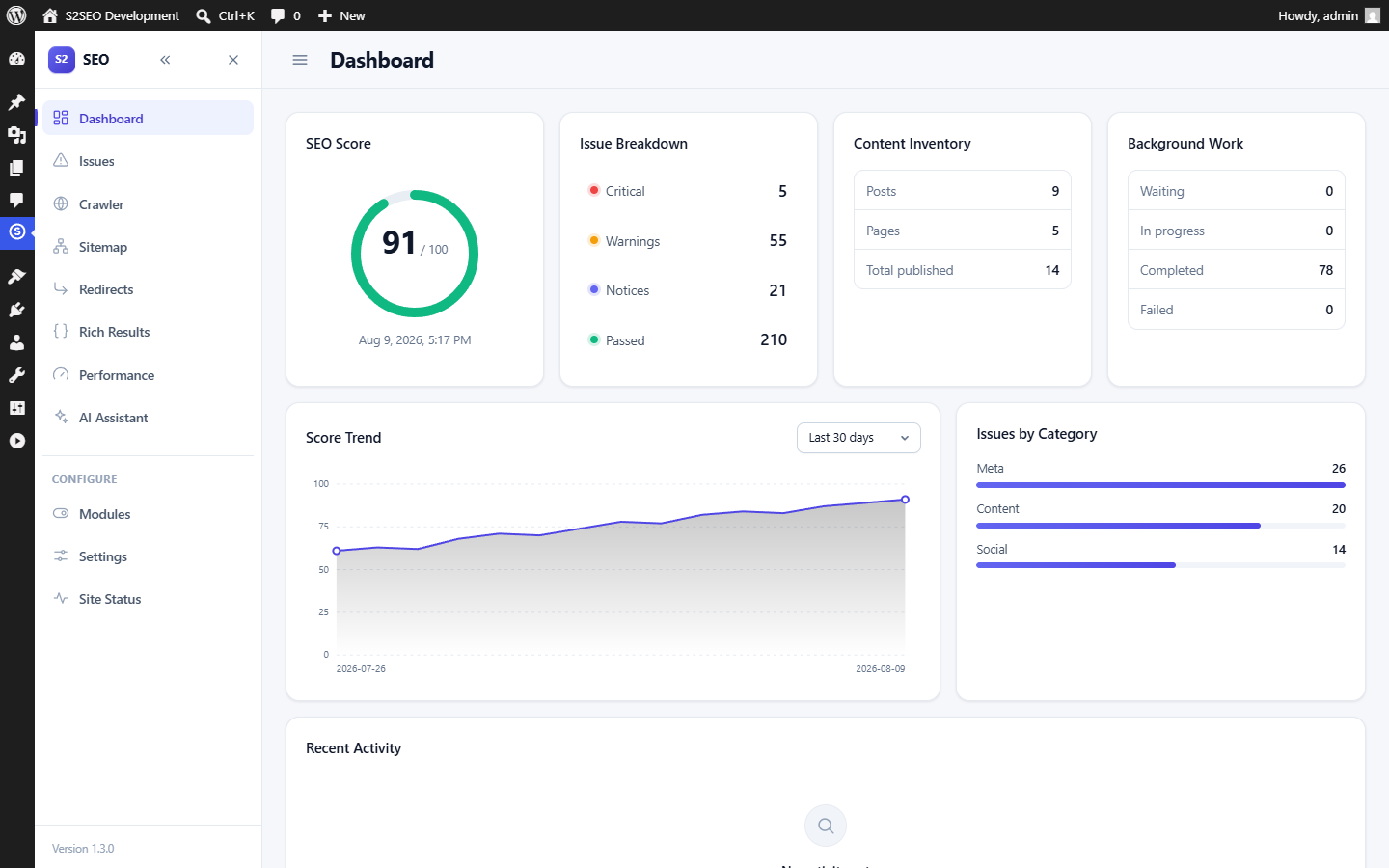
Real output from a real audit and a real crawl — including live Core Web Vitals data from Google.
Most SEO plugins differ in features. These are the places S2SEO differs in judgement.
PageSpeed returns two unrelated measurements and most tools average them into one number. Only the Chrome UX Report data is what Google ranks on; the Lighthouse run is a simulation. They routinely disagree, so S2SEO shows them in separate cards and says which is which.
Not 100 minus penalties. Penalties are unbounded, and adding a new check to a plugin that works that way retroactively lowers every page on every site that installs the update.
A sitemap that reports every URL as changed today teaches search engines to ignore the field. Where a genuine date is not available — a term archive also changes when a post leaves it — the element is left out rather than invented.
Telling Google not to index a page and then listing it in the sitemap is a contradiction, and the sitemap is the half that gets believed less. The screen reports each exclusion and the reason for it.
Crawls, audits and analysis run through a background job queue in short batches. Workers claim jobs with a single atomic UPDATE, so cron, a page view and WP-CLI can all drain the queue at once without collisions.
The admin interface is plain JavaScript and inline SVG. Every database-sourced string is written with textContent, never innerHTML.
WordPress
6.4 or newer
PHP
8.1 or newer
MySQL
5.7 / MariaDB 10.3
Licence
GPL-2.0-or-later
S2SEO sends nothing anywhere unless you configure it to. Two optional features call an external service — Google PageSpeed Insights for the Performance screen and OpenAI for the assistant — and neither does anything until you supply your own API key. With no keys set, the plugin makes no outbound requests other than fetching your own pages in order to audit them.
No. Auditing, crawling, sitemaps, structured data, redirects and 404 monitoring all work with no keys at all. A free PageSpeed Insights key is needed for the Performance screen, and an OpenAI key for the AI assistant. Both are optional.
Into your own database, in a separate option that is not autoloaded. They are never returned to the browser — the settings screen only shows whether a key is present — and they are sent only to the service they belong to, only when you ask for something that needs it.
Admin styles and scripts load only on S2SEO screens, and modules declare which request contexts they apply to, so nothing analysis-related runs on a front-end page view. The only thing on every front-end request is the redirect lookup, which is one indexed query on a hash.
Yes. WordPress has published /wp-sitemap.xml since 5.5 and it knows nothing about which pages you marked noindex. Two sitemaps that disagree is worse than either alone, so core's is switched off.
That is what it is built for. Sitemap pages are queried with a limit rather than loaded and sliced — a thousand URLs costs a constant number of queries — audits run as queued jobs in batches, and the crawler keeps its whole state in the database so a worker that dies loses only the URL it was fetching.
Not unless you ask it to. Data removal is off by default and controlled by a single setting. Deactivating never removes anything.
No build step, no framework, no third-party script. If you want something changed for your site, we build it.
Talk to us